Validators
Validators are responsible for committing new blocks in the blockchain. These validators participate in the consensus protocol by broadcasting votes which contain cryptographic signatures signed by each validator's private key.
The active validator set is a Dash quorum. Each validator has voting power
100; membership and quorum keys determine participation. See the
validator-set terminology
and proposer selection.
Becoming a Validator
On Dash Platform, becoming a validator requires operating an evonode with 4,000 DASH collateral and registering it with a ProTx transaction. Follow the Dash evonode setup and registration guide for the current operator requirements and setup procedure.
The initial validator set comes from genesis and ABCI InitChain. On a running
chain, the application supplies validator-set updates in PrepareProposal and
ProcessProposal; changes agreed in block H take effect at H+1. Joining the P2P
network or editing a local genesis file does not add a validator to a live chain.
See validator-set and parameter changes and the startup handshake.
Setting up a Validator
When setting up a validator there are countless ways to configure your setup. This guide is aimed at showing one of them, the sentry node design. This design is mainly for DDOS prevention.
Network Layout
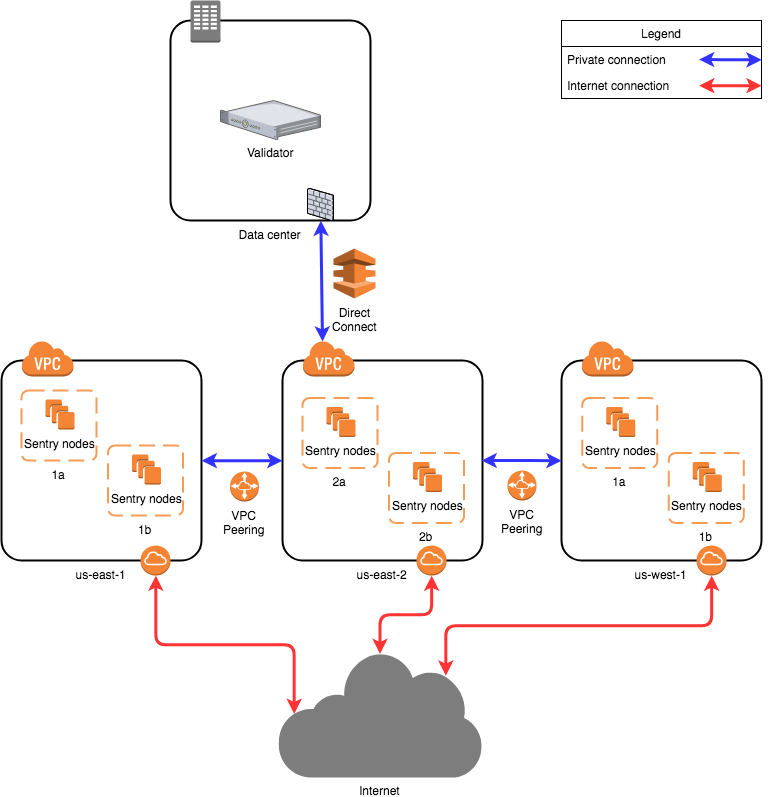
The diagram is based on AWS, other cloud providers will have similar solutions to design a solution. Running nodes is not limited to cloud providers, you can run nodes on bare metal systems as well. The architecture will be the same no matter which setup you decide to go with.
The proposed network diagram is similar to the classical backend/frontend separation of services in a corporate environment. The “backend” in this case is the private network of the validator in the data center. The data center network might involve multiple subnets, firewalls and redundancy devices, which is not detailed on this diagram. The important point is that the data center allows direct connectivity to the chosen cloud environment. Amazon AWS has “Direct Connect”, while Google Cloud has “Partner Interconnect”. This is a dedicated connection to the cloud provider (usually directly to your virtual private cloud instance in one of the regions).
All sentry nodes (the “frontend”) connect to the validator using this private connection. The validator does not have a public IP address to provide its services.
Amazon has multiple availability zones within a region. One can install sentry nodes in other regions too. In this case the second, third and further regions need to have a private connection to the validator node. This can be achieved by VPC Peering (“VPC Network Peering” in Google Cloud). In this case, the second, third and further region sentry nodes will be directed to the first region and through the direct connect to the data center, arriving to the validator.
A more persistent solution (not detailed on the diagram) is to have multiple direct connections to different regions from the data center. This way VPC Peering is not mandatory, although still beneficial for the sentry nodes. This overcomes the risk of depending on one region. It is more costly.
Local Configuration
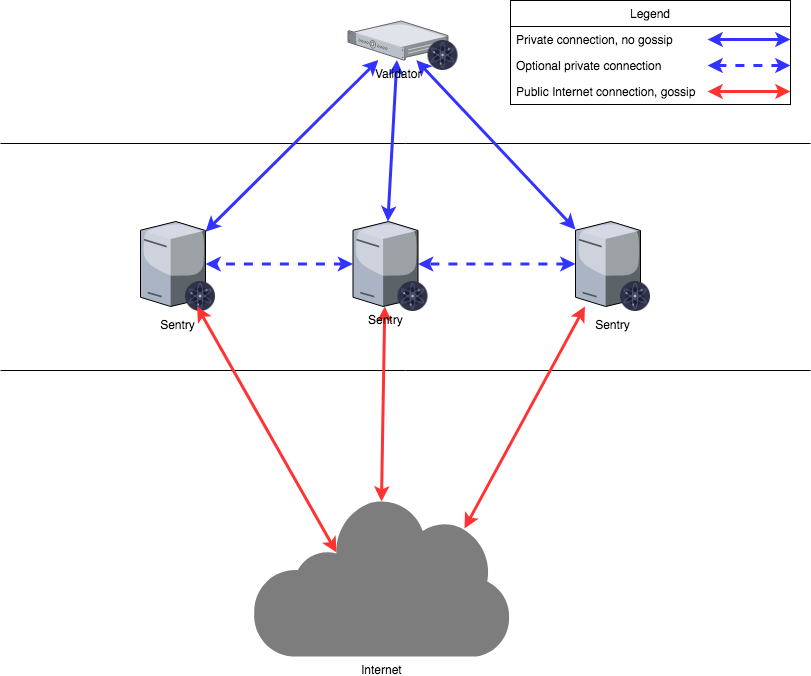
The validator will only talk to the sentry that are provided, the sentry nodes will communicate to the validator via a secret connection and the rest of the network through a normal connection. The sentry nodes do have the option of communicating with each other as well.
When initializing nodes there are several parameters in the config.toml that may need to be altered.
mode:(full | validator | seed) Mode of node (default: 'full'). If you want to run the node as validator, change it to 'validator'.pex:boolean. This turns the peer exchange reactor on or off for a node. Whenpex=false, only thepersistent-peerslist is available for connection.persistent-peers:a comma separated list ofnodeID@ip:portvalues that define a list of peers that are expected to be online at all times. This is necessary at first startup because by settingpex=falsethe node will not be able to join the network.unconditional-peer-ids:comma separated list of nodeID's. These nodes will be connected to no matter the limits of inbound and outbound peers. This is useful for when sentry nodes have full address books.private-peer-ids:comma separated list of nodeID's. These nodes will not be gossiped to the network. This is an important field as you do not want your validator IP gossiped to the network.addr-book-strict:boolean. By default nodes with a routable address will be considered for connection. If this setting is turned off (false), non-routable IP addresses, like addresses in a private network can be added to the address book.
Validator Node Configuration
| Config Option | Setting |
|---|---|
| mode | validator |
| pex | false |
| persistent-peers | list of sentry nodes |
| private-peer-ids | none |
| unconditional-peer-ids | optionally sentry node IDs |
| addr-book-strict | false |
To run the node as validator ensure mode=validator. The validator node should have pex=false so it does not gossip to the entire network. The persistent peers will be your sentry nodes. Private peers can be left empty as the validator is not trying to hide who it is communicating with. Setting unconditional peers is optional for a validator because they will not have a full address books.
Sentry Node Configuration
| Config Option | Setting |
|---|---|
| mode | full |
| pex | true |
| persistent-peers | validator node, optionally other sentry nodes |
| private-peer-ids | validator node ID |
| unconditional-peer-ids | validator node ID, optionally sentry node IDs |
| addr-book-strict | false |
The sentry nodes should be able to talk to the entire network hence why pex=true. The persistent peers of a sentry node will be the validator, and optionally other sentry nodes. The sentry nodes should make sure that they do not gossip the validator's ip, to do this you must put the validators nodeID as a private peer. The unconditional peer IDs will be the validator ID and optionally other sentry nodes.
Note: Do not forget to secure your node's firewalls when setting them up.
More Information can be found at these links:
- https://web.archive.org/web/2021/https://kb.certus.one/
- https://forum.cosmos.network/t/sentry-node-architecture-overview/454
Validator keys
Tenderdash validators use BLS consensus keys and Dash quorum information. Protect both the private key and the signing state that prevents conflicting votes. Never run two active signers with the same consensus identity.
A remote signer must support Tenderdash's BLS keys and quorum-aware signing requests. Check compatibility before choosing a key management server or HSM; support for Ed25519 in another consensus system does not establish compatibility. See remote signers and the signing specification.
Committing a Block
Tenderdash commits contain a recovered BLS threshold block signature and threshold vote-extension signatures, rather than individual validator signatures. The configurable voting threshold and the quorum's signature recovery threshold are distinct; the label "+2/3" in consensus code does not always mean a strict two-thirds count.
Use the canonical threshold definitions, threshold recovery procedure and commit handling rules.